Mission Control,
finally in control.
Give every desktop — every Space — a name, a color, gradients, borders; throw in a picture, an icon, or an emoji. Then recognize each one the instant Mission Control opens. Your workspace finally has a map.
Give every desktop
an identity.
Spaces Pro adds the visual organization macOS Spaces have always been missing—without hacking the system or getting in your way.
Name Your Spaces
Give Desktop 1, Desktop 2, and Desktop 3 real names that match the way you actually work — same Spaces, finally recognizable.
Pictures & Colors
Add a picture, choose a color, and customize the appearance so every Space has an identity of its own.
Mission Control Overlays
Your labels stay out of the way while you work, then appear clearly when Mission Control opens.
Jump to Any Space
Warp to another Space right from the menu bar — or open the default Mission Control and click the desktop you want.
Native macOS Experience
Built to feel at home on the Mac, with a lightweight workflow and no SIP changes or system hacks.
Color, picture,
personality.
Design each Space to match how you think. Pick a color or gradient, drop in a photo, add an icon or emoji — and watch it update live.
- Colors, gradients & custom images
- Icons and emoji for instant recognition
- Set a default style for every new Space
Four steps.
Total clarity.
Create your workspace map once. Spaces Pro keeps every desktop recognizable from then on.
Create a label
Choose a name, color, picture, and appearance for the Space you want to identify.
Bind it to a Space
Switch to the desired desktop and assign its card using the guided setup flow.
Open Mission Control
See every Space clearly identified the moment Mission Control opens.
Jump instantly
Click any labeled Space directly from the app to switch without hunting for it.
However you work,
there's a Space for it.
Meetings, deep work, side projects, gaming, home — give each its own desktop and never lose your place again.

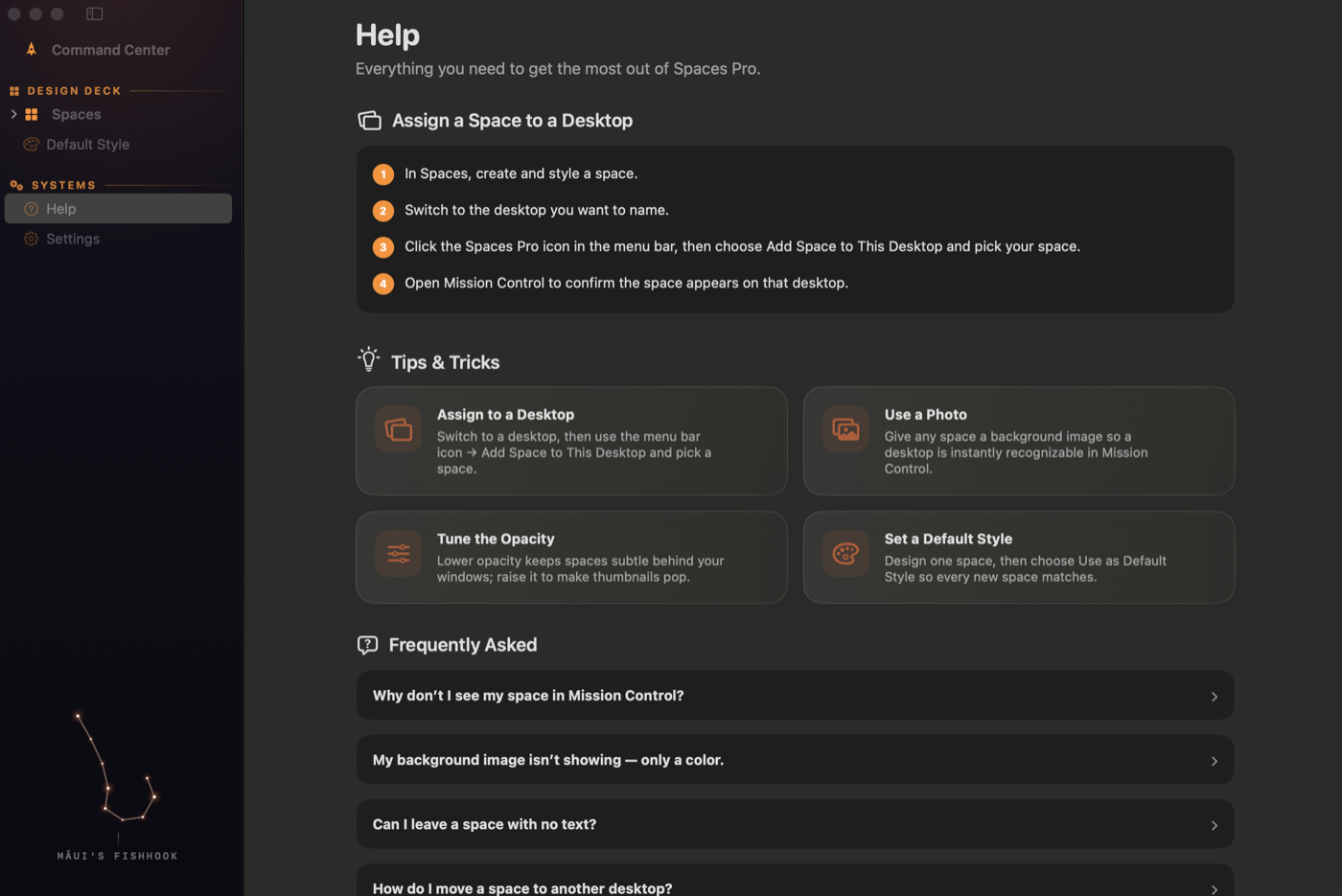
Help is built
right in.
Step-by-step guidance, tips & tricks, and answers to common questions live inside the app — so you're up and running in minutes.
- Guided setup for your first Space
- Tips for pictures, opacity & default styles
- Answers to the most common questions
Stop guessing.
Start knowing.
Spaces Pro brings names, color, pictures, and identity to your macOS desktop Spaces.
Download on the Mac App Store